, which opens
the Inventory
Transaction module. An additional tab may appear, called Shipment
Details.
, which opens
the Inventory
Transaction module. An additional tab may appear, called Shipment
Details.The Inventory Transactions page lists the inventory transactions for all projects. Users with the proper permissions can add items to the inventory or make adjustments to the inventory, i.e. indicating an item is destroyed or expired.
If the user does not have access to every Project within the Domain Type, then the transactions in the list will be restricted to the user’s projects, limited to the Return from Site and Send to Site and the Add New button will be hidden.
To view the list, the user must select the Domain Type (this filter will display if the user has been licensed for both domain types, Production and Test. If visible, Production is the default) and the Inventory Type. Additional filters include:
Adj Type - Damaged, Expired, Other, or Returned
Also, users can perform a Search for a word or string in the record. To remove all search options, click the Reset Filters button.
To add a record, click the Add New
button or edit a record, click , which opens
the Inventory
Transaction module. An additional tab may appear, called Shipment
Details.
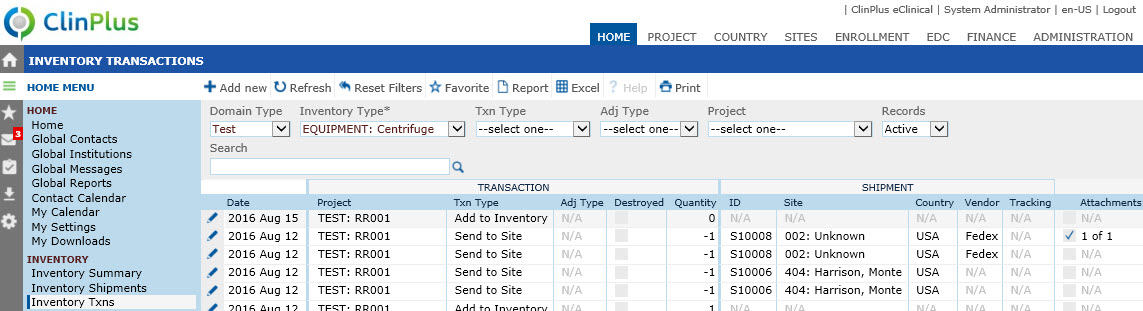
The records will display in descending order based on the Transaction Date. If multiple transactions occur on the same date, they will be displayed in the following order:
Return from Site
Adjustment
Send to Site
Add to Inventory
If multiple transactions occur on the same date with the same Transaction Type, they will be displayed in descending order based on the order in which they were created.
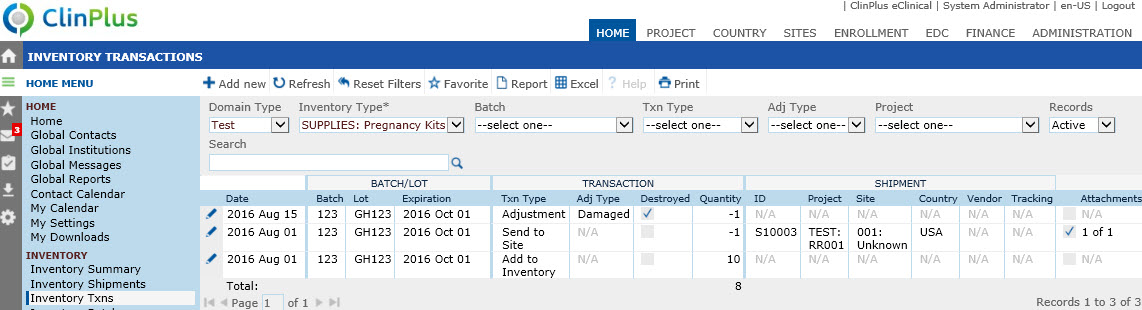
The Lot column will appear if the Show Lot field is checked on the Inventory Type module.
The Expiration column will appear if the Show Expiration Date field is checked on the Inventory Type module.
The Project column will appear under the Transaction and Shipment headers if the Unique ID Scope field is set to Project on the Inventory Type module.Most columns can be sorted in ascending or descending order by clicking the column heading.
Click Common Buttons for a description of the buttons found throughout the system and their uses.
Inventory Items with Batch and/or Lot Numbers
Inventory Items with or without Unique Identifiers