 to
add one document at a time or
to
add one document at a time or  to edit the Attachment; or
  to download the document.
Other tabs are available to track additional information including Deviation,
Pre-Approval,
Corrective
Action, and Custom
Fields.
to download the document.
Other tabs are available to track additional information including Deviation,
Pre-Approval,
Corrective
Action, and Custom
Fields.The Attachments tab maintains
supporting documentation of the deviation. Users can click to
add one document at a time or
to edit the Attachment; or to download the document.
Other tabs are available to track additional information including Deviation,
Pre-Approval,
Corrective
Action, and Custom
Fields.
The Document Type base table is ProtocolDeviation.
Click Common Buttons for a description of the buttons found throughout the system and their uses.
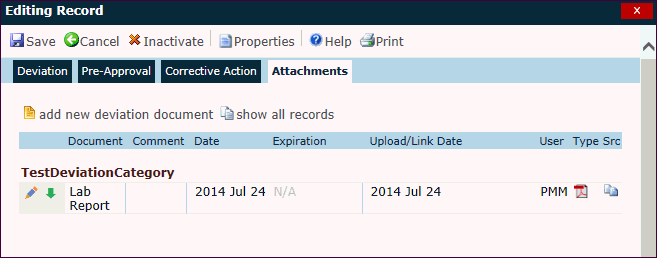
Field |
Description |
Document |
This column lists the document names. |
Comment |
This column displays any comments made on the Document module. |
Date |
This column displays the date provided for the document. |
Expiration |
This column displays the date that the document expires. It will display N/A if the document was defined to not have an expiration date on the Document module. |
Upload/Link Date |
This column displays the date that the document was added to the system. |
User |
This column displays the initials of the user who uploaded the document. |
Type |
This column displays an icon of the document's file type, e.g. Word, Excel, PDF, etc. The available icons are listed on the Document Extensions page on the System Tables page of the Administration tab. |
Src |
This column displays an icon that indicates the location and availability of the document.
|
 Uploaded to CTMS Database
 Linked to Network File
 Linked to Network File, but file is not found
 Linked to Network File, not linking to network files is no longer
enabled in Configuration
Linked to Network File, not linking to network files is no longer
enabled in Configuration Linked to SharePoint Document
 Linked to SharePoint Document, but document is not found
 Linked to SharePoint Document, but linking to SharePoint is no
longer enabled in Configuration or the SharePoint Site has been
inactivated
Linked to SharePoint Document, but linking to SharePoint is no
longer enabled in Configuration or the SharePoint Site has been
inactivated