 , which opens the Site Inventory Transaction
Item module.
, which opens the Site Inventory Transaction
Item module. The Inventory Item module provides the user with the ability to view or edit an inventory record.
To view a record, click , which opens the Site Inventory Transaction
Item module.
After clicking Save or Cancel, the system will return to the Inventory Items page on the Home tab or the Inventory Items page on the Sites tab.
Click Common Buttons for a description of the buttons found throughout the system and their uses.
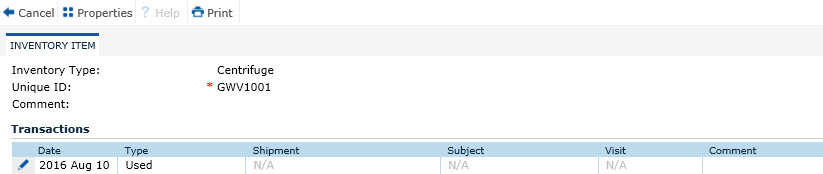
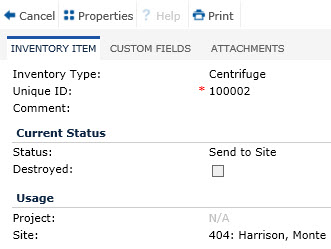
Field |
Description |
Inventory Item Type |
This field is read only. |
Unique ID |
This field is required and can hold up to 25 characters. The caption for this field will be set to the value of the Unique ID Caption of the Inventory Type module. |
Comment |
This field can hold up to 200 characters. |
CURRENT STATUS |
All fields in this section will be read only |
Status |
This field displays the status set on the Inventory Items page. |
Destroyed |
A check in this box indicates that the inventory item has been destroyed. |
Destroy Date |
This field will be hidden unless the Destroyed field is checked. |
Destroy Comment |
This field will be hidden unless the Destroyed field is checked. |
USAGE |
|
Project |
This field displays the project that the inventory is connected to. |
Site |
This field displays the site that the inventory is connected to. |
Subject |
This field will be hidden unless the Show Subject field is checked on the Inventory Type module. |
Subject Visit |
This field will be hidden unless the Show Subject Visit field is checked on the Inventory Type module. |