 to open the Data Import
module. Additional information is available on the Data Import Type, Key Fields, Datasets,
and Schedule
tabs.
to open the Data Import
module. Additional information is available on the Data Import Type, Key Fields, Datasets,
and Schedule
tabs.The Import page displays the
10 most recent Data Import records in descending order by Run Time. Click the Add
New Data Import button to open the
New
Data Import module to start
the import process. Click to open the Data Import
module. Additional information is available on the Data Import Type, Key Fields, Datasets,
and Schedule
tabs.
Clicking Save or Cancel returns you to the Data Import Types tab.
Click Common Buttons for a description of the buttons found throughout the system and their uses.
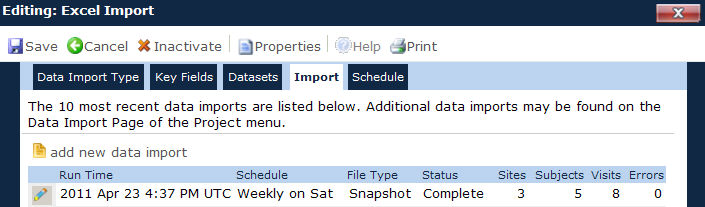
Field |
Description |
Run Time |
This column indicates the actual time that the data import was processed or ran. |
Schedule |
This column indicates the type of schedule that the import was on, such as Weekly or Manual. |
File Type |
This column indicates the type of file, such as a Snapshot or Transactional. |
Status |
This column indicates if the import is:
|
Sites |
This column indicates the total number of Sites involved in the import. |
Subjects |
This column indicates the total number of Subjects involved in the import. |
Visits |
This column indicates the total number of Visits involved in the import. |
Errors |
This column indicates the total number of Errors of the import. |