 ,
which opens the Subject
module. To find an item, enter a word or
string in the Search
filter and press enter. To remove all search
options, click the Reset
Filters button.
,
which opens the Subject
module. To find an item, enter a word or
string in the Search
filter and press enter. To remove all search
options, click the Reset
Filters button.The Enrolled Subjects page displays the list of enrolled subjects for the current site. Screen Failures are not included in this list. Subjects can be added manually or through a Data Import from another system.
The user can add an item by selecting Active
under the Records filter and clicking
he Add New button or edit an item
by clicking ,
which opens the Subject
module. To find an item, enter a word or
string in the Search
filter and press enter. To remove all search
options, click the Reset
Filters button.
Most columns can be sorted in ascending or descending order by clicking the column heading.
Click Common Buttons for a description of the buttons found throughout the system and their uses.
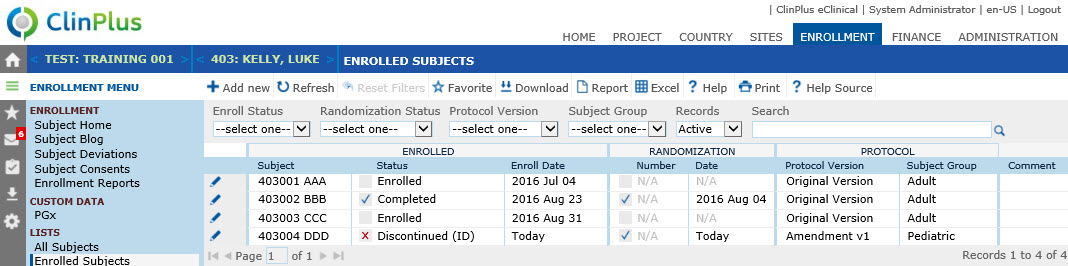
Field |
Description |
Search Fields |
|
Enroll Status |
Records can be filtered by the Enrollment Status of each record. The available choices are:
|
Randomization Status |
Records can be filtered by the Randomization Status of each record. The available choices are:
|
Gender |
Records can be filtered by the gender of each record. This filter will be hidden if the Enable Subject Gender configuration variable under the Enrollment configuration group is set to False. If visible, the available choices are:
|
Protocol Version |
Records can be filtered based on the Protocol Version of each record. The available choices are the list of active Protocol Version records for the current Project. |
Subject Group |
Records can be filtered based on the Subject Group of each record. The available choices are the list of active Subject Group records for the current Project. |
Records |
The user can filter the institutions based on whether the records are active or inactive, or simply select all records. |
Search |
The user can enter any word or string to see if it exists in the institutions database. |
ENROLLED |
|
Subject |
This column lists the subject identification number. |
Status |
This column lists where the subject is in the study. The choices include:
|
Enroll Date |
This column lists the subject's enrollment date. |
RANDOMIZATION |
This section will be visible when the Enable Subject Randomization Configuration Variable under the Enrollment configuration group is set to True, or when the Project is not licensed for IWRS. |
Randomization Icon |
This column lists where the subject is in the study. The choices include:
|
Number |
This column displays the Randomization Number assigned to the subject. This number is assigned on the Enrollment tab of the Subject module. |
Randomization Date |
This column displays the date when the subject was assigned their randomization number. This number is assigned on the Enrollment tab of the Subject module. |
PROTOCOL |
|
Protocol Version |
This column indicates the protocol version that was used when the subject was enrolled. |
Subject Group |
This column will be hidden if Subject Groups have not been defined for the current project. |
Comment |
This column lists any comments or notes made for this subject. |