 button. To add a record, click
  or edit a record, click
  ,
which opens the Test
Article module.
,
which opens the Test
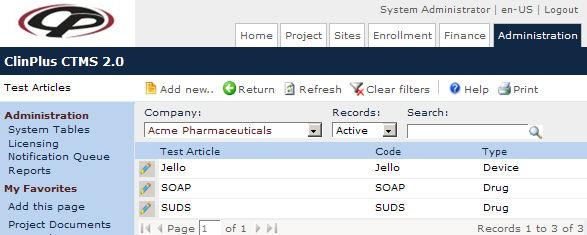
Article module.The Test Articles page lists
all the test articles, such as the study drugs or study devices. A Company must be selected in the
drop down before any records will appear. Then the user can filter by
Active, Inactive,
or All records as well as search
for a word or string in the record. To remove all search options, click
the
button. To add a record, click
or edit a record, click ,
which opens the Test
Article module.
Columns can be sorted in ascending or descending order by clicking the column heading.
Click Common Buttons for a description of the buttons found throughout the system and their uses.
Field |
Description |
Search Fields |
|
Company |
The user can filter the records based on the company listed in the dropdown list. This field will only display if the Application has been licensed for Multiple Companies. |
Records |
The user can filter the records based on whether they are active or inactive, or simply select all records. |
Search |
The user can enter any word or string to see if it exists in the database. |
Column Headings |
|
Company* |
This field will only be displayed if the Application has been licensed for Multiple Companies. It will be populated with all active Company records and is required. |
Test Article* |
This column displays the names of the test articles. |
Code* |
This column indicates the code given to each test article. |
Type* |
This column indicates whether the event will be automatically updated. |