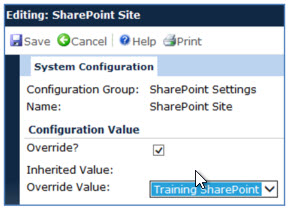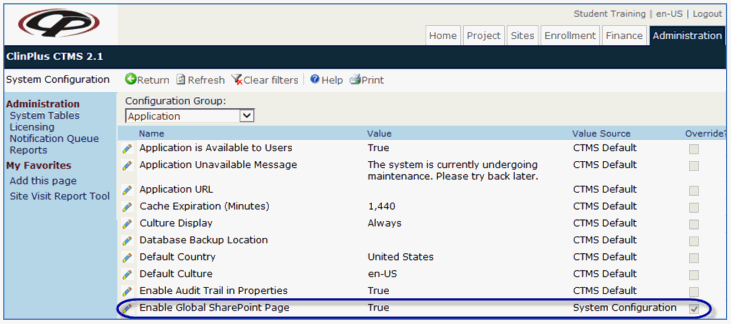
The Global SharePoint page on the Home Tab enables users to browse libraries, folders, and documents within a single SharePoint Site. This page would typically be used
to connect to a company SharePoint Site instead of a single Project.
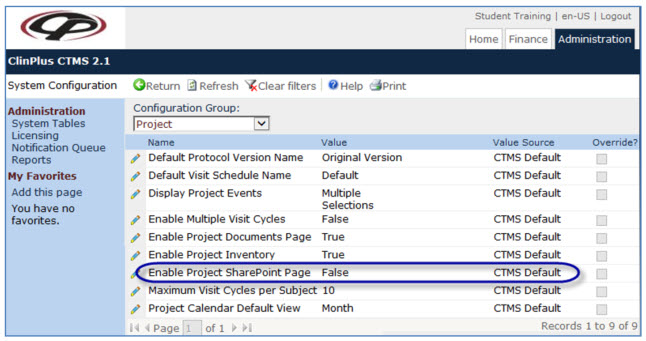
The Project SharePoint page on the Project Tab enables users to browse libraries, folders, and documents within a single SharePoint Site. This page would typically be used to connect to a specific project SharePoint Site, although in smaller companies it could also be the same SharePoint Site as the one linked to the Global SharePoint page.
Document Attachments can be linked to SharePoint documents. When a CTMS document is linked to a SharePoint document, the most current version of the document will be retrieved from the SharePoint Site when the user requests a downloaded copy from CTMS.
A copy SharePoint document is stored in the CTMS database each time in case the SharePoint link becomes unavailable in the future due to network connectivity failure, permission changes, or document file relocation or renaming. When this occurs, the user will be notified that they are viewing an older, saved version of the document.
SharePoint integration includes the libraries and documents features, but not SharePoint Lists and Discussions.
SharePoint integration is a one-way interface in this version of CTMS. There is no way to update the SharePoint documents from within the CTMS.
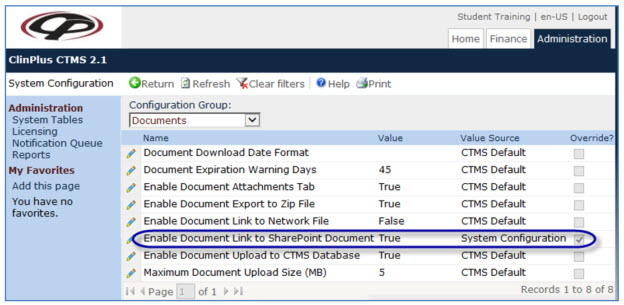
Under the Documents Configuration Group, change the default to true for Enable Document Link to SharePoint Document.
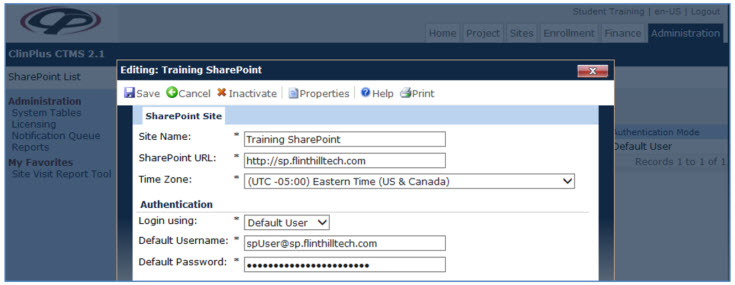
Under the SharePoint Sites system table, enter the required fields. These fields define the connection and security parameters for a single SharePoint Site. The Time Zone of the SharePoint Site is also recorded so that file modification times can be displayed correctly in CTMS.
Authentication credentials can be saved within the SharePoint Site data record (Default User). The default user must be set on the SharePoint Site with appropriate permissions, such as Read, which allows the user to only browse and view documents.
Authentication credentials can be prompted once per session for each user (Current User).