 button. To add a record,
click
button. To add a record,
click  or edit a record, click
  ,
which opens the Deviation
Type module.
,
which opens the Deviation
Type module.The Protocol Deviation Types
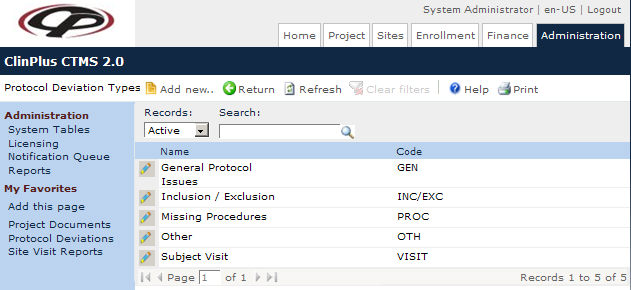
page lists all the possible deviations that may occur in a protocol. Users
can filter the records on Active,
Inactive, or All
as well as search for a word or string in the record. To remove all search
options, click the button. To add a record,
click or edit a record, click ,
which opens the Deviation
Type module.
Columns can be sorted in ascending or descending order by clicking the column heading.
Click Common Buttons for a description of the buttons found throughout the system and their uses.
Field |
Description |
Search Fields |
|
Records |
The user can filter the records based on whether they are active or inactive, or simply select all records. |
Search |
The user can enter any word or string to see if it exists in the database. |
Column Headings |
|
Name* |
This column displays the name of the protocol deviation. |
Code* |
This column indicates the code given to the protocol deviation. |